
Promotion, agency commission and activity bonuses
Two screens drive most of the reward talk around prediction apps: the Agency page, where referral commission is tracked, and the Activity page, where bonuses and rebates live. Here is what each one shows and what the numbers actually mean.
Promotion & Agency
Promotion, agency commission and bonus
The Promotion (Agency) area is where referral earnings are shown. An invitation link or code is shared, and the players who join under it become direct and team subordinates. Commission is calculated daily on their activity, and higher agency levels carry a higher rate.
- 1Open the Promotion / Agency section from the app home screen or menu.
- 2Check yesterday's total commission shown at the top of the Agency page.
- 3Review direct subordinates — players who used the invitation link or code.
- 4Review team subordinates (the full downline, including indirect invites) and level progress.
- 5Copy the invitation link or code to share it on messaging apps.
- 6As team activity grows, the agency level increases and the commission rate improves.
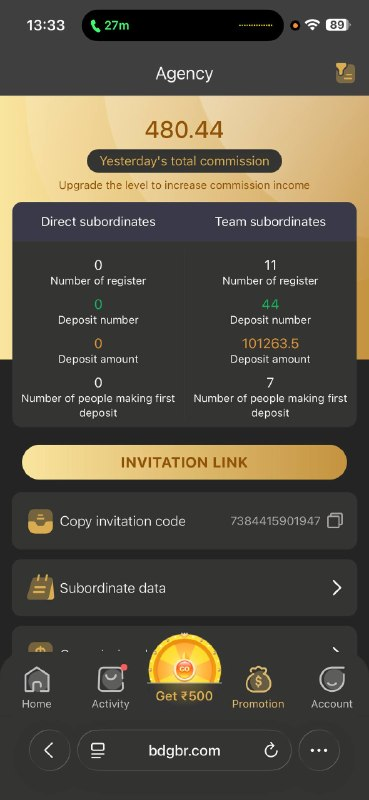
Agency screen showing commission, direct and team subordinate statistics.
What the Agency screen shows
Yesterday's commission
A daily figure calculated from subordinate activity, not from your own play.
Direct subordinates
People who registered using your own invitation link or code.
Team subordinates
The wider downline, including people invited by your direct referrals.
Register and deposit counts
How many joined, how many deposited, and the total deposit amount behind the commission.
Invitation link and code
The shareable identifiers that attribute a new account to your team.
Level progress
Rate tiers unlock as team volume grows, which is exactly what motivates sharing.
Worth being blunt about this: commission is funded by the margin on other people's losses. Recruiting friends or family into that structure has a social cost no dashboard displays, and rates can be changed by the operator at any time.
Activity & Bonus
How the Activity bonus page works
The Activity page collects the reward mechanics — invitation bonuses, rebates, jackpots, gifts and attendance rewards. Every one of them is a marketing cost designed to increase play volume, so read the conditions before counting on any amount.
- 1Open the Activity page from the bottom menu or home screen.
- 2Check today's bonus and total bonus shown at the top of the page.
- 3Tap Invitation bonus to see rewards for inviting new players who register and deposit.
- 4Look at Betting rebate, Super Jackpot and Invite Wheel for extra reward opportunities.
- 5Enter daily gift or redemption codes under Gifts to receive gift rewards.
- 6Claim Attendance bonus and Recharge bonus on qualifying days and amounts.
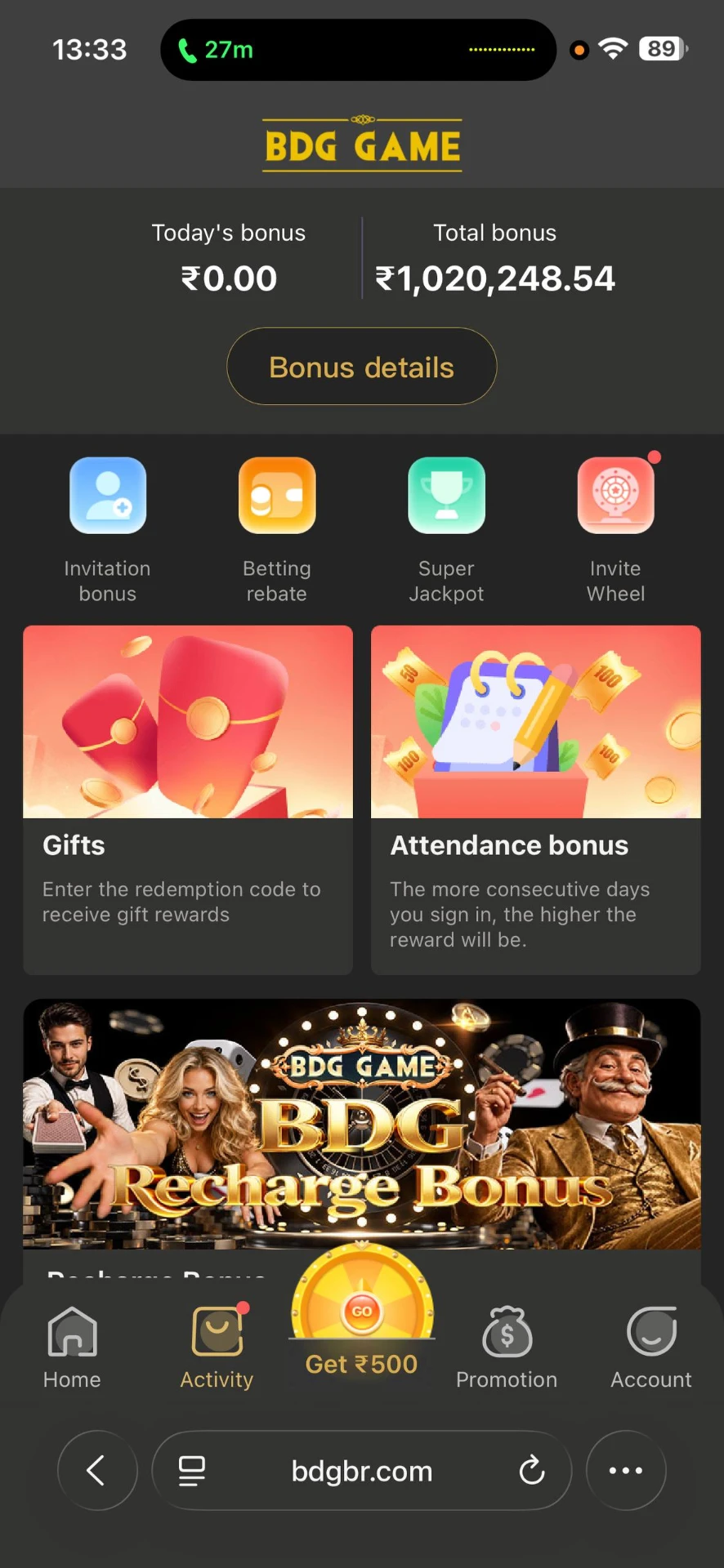
Activity screen showing invitation, rebate, jackpot and recharge bonuses.
Before you chase a bonus
Turnover conditions
Bonus credit is usually locked behind a play-through requirement before it can be withdrawn.
Qualifying deposits
Recharge and attendance rewards often need a minimum amount on specific days.
Rebates are not profit
A rebate returns a slice of what was already staked; the house margin still applies.
Codes expire
Gift and redemption codes are time-limited, and codes circulated in groups are frequently fake.
Terms change
Reward tables are adjusted at the operator's discretion, without notice.
Totals are cumulative
A large 'total bonus' figure is lifetime credit, not a withdrawable balance.